Why Your Business Needs a Mobile-Friendly Website Design

A mobile-friendly website is essential for businesses that want to reach customers, provide a positive user experience, and remain competitive online. With people accessing websites from smartphones and tablets throughout the day, your website needs to work just as effectively on smaller screens as it does on desktop computers.
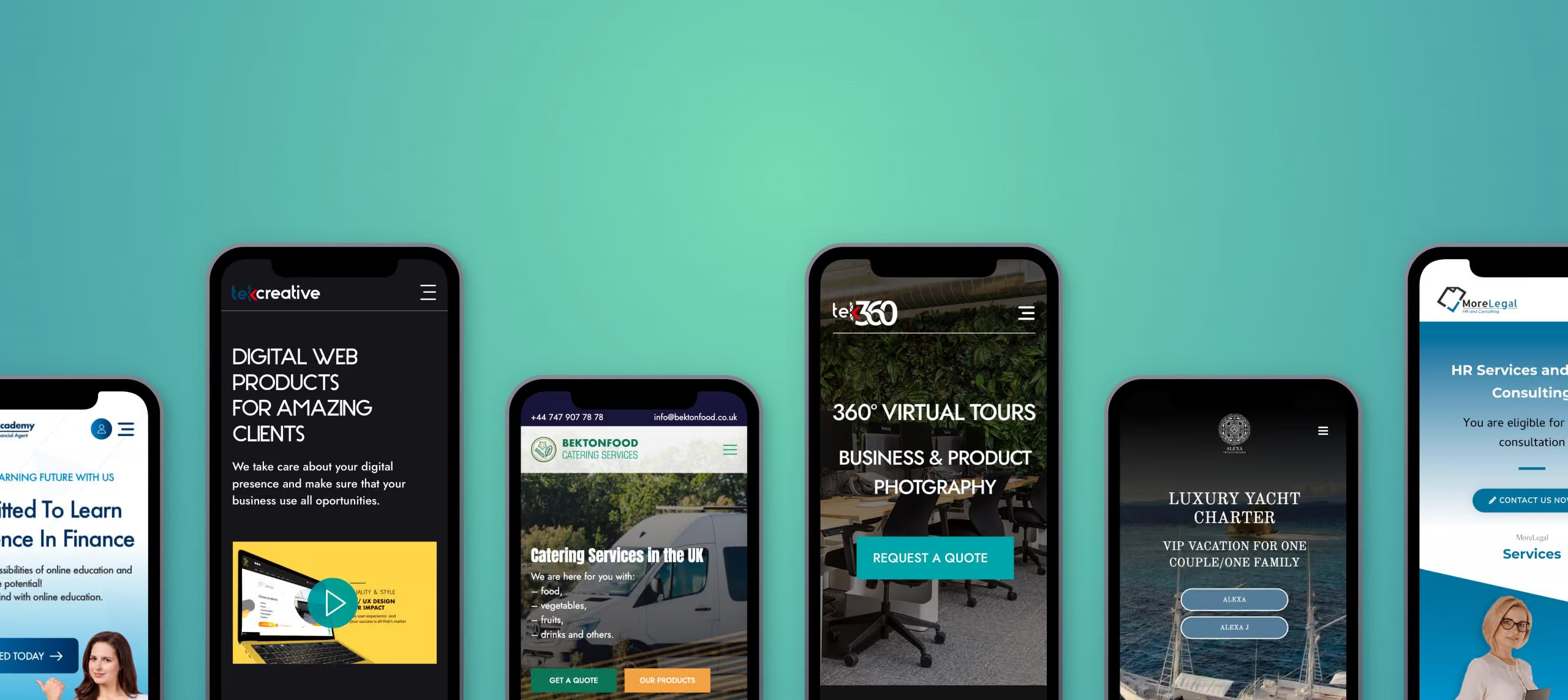
A website that is difficult to navigate on mobile devices can frustrate visitors, reduce enquiries, and create a poor impression of your business. In contrast, a responsive website design makes it easier for users to find information, explore your services, and take action.

Here are five reasons why investing in a mobile-friendly website design is important for your business.

1. Improve Your Search Engine Visibility

Mobile optimisation is an important part of technical SEO and website usability. Google primarily uses the mobile version of a website’s content for indexing, making it important to ensure that mobile users and search engines can access the same essential information.

A responsive website helps maintain a consistent experience across devices while making content easier to access and navigate.

However, mobile-friendly design alone does not guarantee higher search rankings. Search visibility also depends on content quality, website performance, technical SEO, and other ranking factors.

By combining responsive web design with a well-structured website and useful content, businesses can establish a stronger foundation for organic search performance.

2. Deliver a Better Mobile User Experience

Visitors expect websites to be easy to use, regardless of the device they choose. If text is too small, navigation is difficult, or important buttons are hard to tap, users may leave before finding what they need.

A well-designed mobile website adapts its layout to different screen sizes and prioritises the information visitors need most.

Important considerations include readable typography, clear navigation, appropriately sized buttons, well-structured content, and forms that are easy to complete on a touchscreen.

Mobile usability is particularly important for businesses that rely on website enquiries, bookings, or online sales. Removing unnecessary friction helps visitors move through the website and complete important actions more easily.

3. Reach More Potential Customers

Mobile devices are an important source of website traffic for businesses across many industries. Customers may discover your company through search engines, social media, online advertising, or links shared by other people, often while using a smartphone.

If your website does not work properly on mobile devices, you risk losing potential customers before they have an opportunity to understand your services.

Responsive web design allows your website to adapt to different devices without requiring separate desktop and mobile versions. This makes it easier to provide a consistent experience wherever visitors access your website.

For businesses looking to generate enquiries and sales online, supporting mobile users is an essential part of reaching and converting potential customers.

4. Build Trust and Professional Credibility

Your website often creates a first impression of your business. A poorly displayed mobile website can make a company appear outdated or difficult to deal with, even when its services are excellent.

A professional mobile website demonstrates attention to detail and helps visitors interact with your business confidently.

Clear service information, readable content, consistent branding, accessible contact details, and straightforward navigation all contribute to a more credible online presence.

The experience should also remain consistent across desktop and mobile devices. Visitors should be able to find the same essential information and complete important actions without encountering unnecessary limitations.

A well-designed mobile website helps reinforce your brand and makes it easier for potential customers to engage with your business.

5. Reduce Development and Maintenance Costs

In the past, some businesses maintained separate desktop and mobile websites to accommodate different screen sizes. Managing multiple versions can increase development time, create duplicated work, and make updates more complicated.

Responsive web design provides a more practical approach by allowing a single website to adapt to different devices.

With a responsive design, businesses can maintain one content management system, update information centrally, and improve the website without managing separate desktop and mobile experiences.

The initial development cost depends on the website’s complexity, design, and functionality. However, a well-planned responsive website can simplify ongoing maintenance and reduce unnecessary duplication.

It also provides a more flexible foundation for future improvements as new devices and screen sizes emerge.

Why Responsive Web Design Matters for Your Business

A mobile-friendly website is more than a design preference. It supports search visibility, usability, customer engagement, and the overall effectiveness of your online presence.

By ensuring that your website works well across smartphones, tablets, and desktop computers, you make it easier for visitors to access information and interact with your business.

A successful responsive website should also consider page speed, accessibility, content structure, and conversion paths. Simply shrinking a desktop layout to fit a smaller screen is not enough. The design and functionality must be appropriate for the way people use each device.

Create a Mobile-Friendly Website with TekCreative

At TekCreative, we develop websites that combine professional design with reliable technical implementation. Our approach focuses on creating responsive, accessible, and performance-conscious websites that support real business objectives.

Whether you need a new business website, improvements to an existing design, or a more comprehensive redevelopment, we can help you create an online experience that works across devices.

Explore our user experience and design services to learn how we approach website usability and responsive design.

You can also read our guide to 10 principles of clean and professional website design for more practical advice on creating a clear and consistent online experience.

If your website is difficult to use on mobile devices or no longer meets your business requirements, contact TekCreative to discuss how we can improve it.

featured posts

You might also like…

This is three col posts

A Simple Guide for an E-commerce project

Open post

Headless CMS: A Game-Changer for Modern Websites

Open post

Optimizing WordPress: Streamlining with Essential Plugins

Open post

Web Design vs. Web Development

Open post

WooCommerce vs. Shopify in 2026 – E-Commerce Dilemma

Open post
WHY US

Why choose u003cbu003eTekCreative?u003c/bu003e

We’re technical specialists who work across development, rebuilds and migrations, performance optimisation and ongoing support. We look at the code, database, integrations and infrastructure behind a platform, not just the visible frontend.rnrnWe don’t recommend a technology simply because it is newer, and we don’t build custom software when an existing platform is sufficient. We assess the requirements, explain the options and choose an approach that fits the project.rnrnOur work is based on measurable technical information wherever possible. We use profiling, testing and performance data to understand what is happening, then use that information to guide the work.

Results You Can Measure

We use technical measurements where they are relevant to the project, including performance data, Core Web Vitals, server response times, database performance and other project-specific indicators.

We Own the Technical Work

We work directly on the platforms we develop and support, with the technical decisions and implementation handled by our development team rather than passed through multiple layers.

We Don't Disappear After Launch

Launch is not necessarily the end of the technical work. We can continue with monitoring, maintenance, troubleshooting, performance improvements and further development as the platform evolves.

50+

Projects Delivered

5+

Years of Expertise

CONTACT US

Get in touch

Have a platform that needs improving, a new system to build, a migration to plan or technical problems that need investigating? Tell us what you’re working with, and we’ll give you a clear view of the possible approach.

Give us a call and get an answer in seconds

Speak directly with our team about your platform, what you’re trying to improve and the technical challenges you’re facing. We’ll give you an honest view of what would be involved and where we can help.

Fill the contact form and we will contact you

Tell us about your current platform, what isn’t working properly, what you’re trying to build or where you need technical support. We’ll review the details and come back with a clear assessment and next steps.

10 Principles of Clean and Professional Website Design

A professional website design does more than make a business look good. It helps visitors understand what a company offers, find the information they need, and feel confident about taking the next step.

A cluttered layout, inconsistent typography, slow-loading images, or confusing navigation can make even a good business appear less credible. In contrast, a clean and well-structured website creates a positive first impression while making it easier for visitors to interact with your content.

Whether you are building a new website or improving an existing one, following established web design principles can help you create a more effective online presence.

Here are 10 principles to consider when designing a clean, professional, and user-friendly website.

1. Use a Consistent Colour Palette

Colour plays an important role in how visitors perceive your brand. A consistent colour palette helps establish visual identity, creates a cohesive appearance, and makes important elements easier to recognise.

Start with your primary brand colours and use them consistently across headings, buttons, links, backgrounds, and other interface elements. Neutral colours such as white, grey, and darker tones can provide balance without overwhelming the content.

Avoid introducing too many competing colours without a clear purpose. Instead, use accent colours to highlight important actions, such as contacting your business or requesting a quote.

Colour contrast is equally important. Text and interactive elements should remain easy to distinguish from their backgrounds, including for visitors with visual impairments.

2. Make Effective Use of White Space

White space, also known as negative space, is the empty area between text, images, buttons, and other elements on a page. It does not have to be white. Its purpose is to give content room to breathe.

Effective use of white space improves readability, establishes visual hierarchy, and helps visitors focus on the most important information.

Avoid placing too many elements close together. Give headings, paragraphs, images, and calls to action enough separation to make the page easier to scan.

A clean layout does not mean removing all visual detail. It means creating a deliberate balance between content and space so that every element has a clear purpose.

3. Choose Clear and Consistent Typography

Typography affects both the appearance of a website and how easily visitors can read its content.

Choose typefaces that suit your brand and remain legible across different screen sizes. For most business websites, one or two complementary font families are sufficient. Establish consistent styles for headings, body text, buttons, navigation, and supporting information.

Use a clear heading hierarchy to organise content. An H1 should communicate the page’s main topic, while H2 and H3 headings divide the content into meaningful sections.

Body text should be comfortable to read on desktop and mobile devices. Pay attention to font size, line height, paragraph length, and contrast.

Consistent typography creates a more polished experience and helps visitors understand the structure of each page.

4. Maintain Consistent Alignment and Layout

A well-organised website uses consistent spacing, alignment, and layout rules to create a coherent visual experience.

Grid systems help designers position elements in relation to one another, keeping text, images, cards, and other components visually connected. Consistent content widths and spacing also make pages easier to scan.

For example, service pages can share a common structure for headings, descriptions, images, and calls to action. This gives the website a consistent appearance without making every page identical.

Good alignment is not just about aesthetics. It helps visitors understand relationships between content elements and navigate information more naturally.

5. Optimise Images for Website Performance

Images can make a website more engaging, communicate complex ideas, and strengthen a brand’s visual identity. However, large or poorly optimised image files can slow down page loading and negatively affect the user experience.

To improve website performance, choose appropriate image dimensions and formats, compress files without excessive quality loss, and avoid loading unnecessarily large images.

Modern formats such as WebP and AVIF can reduce file sizes while preserving visual quality. Responsive images allow browsers to select suitable versions for different screen sizes, while lazy loading can reduce unnecessary loading for images further down a page.

Performance should be considered during the development process, not treated as an afterthought. A visually attractive website also needs to load efficiently and remain responsive during everyday use.

6. Remove Unnecessary Visual Clutter

Every element on a website should serve a purpose. Excessive animations, decorative graphics, competing calls to action, and unnecessary content can distract visitors from the information they need.

A clean website design prioritises clarity. Each page should have a clear objective, with content and interface elements supporting that objective.

Review your pages and ask whether each section helps visitors understand your services, evaluate your business, or take a relevant action. If an element adds no meaningful value, consider removing or simplifying it.

Minimalism is not a requirement for every brand. The goal is to create a design that feels intentional, communicates effectively, and avoids unnecessary distractions.

7. Create Clear and Intuitive Website Navigation

Website navigation should help visitors find information without confusion. If users cannot locate your services, contact details, or other important pages, they may leave before engaging with your business.

Use clear menu labels that describe what visitors will find. Organise related pages into logical categories and maintain consistent navigation across the website.

For larger websites, consider whether dropdown menus, breadcrumbs, search functionality, or structured service categories would make information easier to access.

Calls to action should also be easy to identify. Depending on the page, these might include requesting a quote, booking a consultation, viewing a service, or contacting your team.

Good navigation supports the entire user experience by reducing friction and helping visitors move naturally through the website.

For more guidance, explore TekCreative’s user experience and design services.

8. Design for Mobile Devices

A professional website must work effectively across smartphones, tablets, laptops, and desktop computers. Mobile responsiveness is essential because visitors may access your website from a wide range of devices and screen sizes.

Responsive web design adapts layouts, typography, images, and navigation to the available screen space. Buttons and other interactive elements should be easy to use on touchscreens, while text should remain readable without unnecessary zooming or horizontal scrolling.

Mobile optimisation also requires attention to performance. Large images, excessive scripts, and poorly implemented interface components can make a website frustrating to use on slower connections.

Test key pages and user journeys across different screen sizes. Check forms, navigation menus, buttons, images, and interactive components rather than relying solely on how the homepage looks.

A mobile-friendly website helps create a consistent experience for visitors, regardless of how they access your business online.

9. Proofread All Website Content

Even a visually polished website can appear unprofessional if its content contains spelling mistakes, grammatical errors, outdated information, or inconsistent terminology.

Before publishing a page, check its headings, body text, buttons, forms, contact details, and supporting information. Make sure the language is clear, the information is accurate, and the content reflects your current services and brand.

Content quality also influences usability. Visitors should be able to understand what your business does, who your services are for, and how to get in touch without having to interpret vague or unnecessarily complicated language.

For SEO, use descriptive headings, relevant keywords, and informative page titles naturally. Avoid keyword stuffing or writing content solely to repeat search terms.

Clear, accurate, and well-structured content supports both visitors and search engines.

10. Test, Measure, and Improve Your Website

Website design should not stop when a site goes live. Real users may interact with the website differently from what was expected during the design process.

Testing helps identify problems with navigation, page layouts, forms, mobile usability, accessibility, and performance before they affect too many visitors.

Collect feedback from users and review relevant website data to understand where improvements may be needed. For example, if visitors frequently abandon a contact form, the process may be too complicated or a technical issue may be preventing successful submissions.

Useful checks include:

  • Testing navigation, forms, and interactive elements.
  • Reviewing mobile responsiveness and accessibility.
  • Measuring page performance and loading times.
  • Checking links, content accuracy, and browser compatibility.
  • Reviewing user behaviour and conversion performance.

Continuous improvement allows your website to evolve alongside your business, your customers’ expectations, and changes in technology.

Why Professional Website Design Matters

Clean and professional website design is about more than visual appearance. It combines branding, usability, accessibility, content structure, and technical performance to create a website that works for both visitors and the business behind it.

A consistent colour palette and typography establish a recognisable identity. Clear navigation and thoughtful layouts make information easier to find. Optimised images and responsive development support performance across devices, while testing helps ensure the website continues to meet its objectives.

These principles are most effective when considered together. A visually appealing website will not deliver its full potential if it is difficult to navigate, slow to load, or poorly structured.

Build a Professional Website with TekCreative

At TekCreative, we approach website design and development as connected parts of a wider technical solution. The aim is to create websites that look professional, communicate clearly, perform reliably, and support real business objectives.
From user experience and interface design to custom WordPress development and website performance optimisation, we help businesses build and improve their online presence around their specific requirements.

A well-designed website should not simply look good. It should make it easier for customers to understand your business, trust your brand, and take the next step.

featured posts

You might also like…

This is three col posts

A Simple Guide for an E-commerce project

Open post

Headless CMS: A Game-Changer for Modern Websites

Open post

Optimizing WordPress: Streamlining with Essential Plugins

Open post

Web Design vs. Web Development

Open post

WooCommerce vs. Shopify in 2026 – E-Commerce Dilemma

Open post
WHY US

Why choose TekCreative?

We’re technical specialists who work across development, rebuilds and migrations, performance optimisation and ongoing support. We look at the code, database, integrations and infrastructure behind a platform, not just the visible frontend.

We don’t recommend a technology simply because it is newer, and we don’t build custom software when an existing platform is sufficient. We assess the requirements, explain the options and choose an approach that fits the project.

Our work is based on measurable technical information wherever possible. We use profiling, testing and performance data to understand what is happening, then use that information to guide the work.

Results You Can Measure

We use technical measurements where they are relevant to the project, including performance data, Core Web Vitals, server response times, database performance and other project-specific indicators.

We Own the Technical Work

We work directly on the platforms we develop and support, with the technical decisions and implementation handled by our development team rather than passed through multiple layers.

We Don't Disappear After Launch

Launch is not necessarily the end of the technical work. We can continue with monitoring, maintenance, troubleshooting, performance improvements and further development as the platform evolves.

50+

Projects Delivered

5+

Years of Expertise

CONTACT US

Get in touch

Have a platform that needs improving, a new system to build, a migration to plan or technical problems that need investigating? Tell us what you’re working with, and we’ll give you a clear view of the possible approach.

Give us a call and get an answer in seconds

Speak directly with our team about your platform, what you’re trying to improve and the technical challenges you’re facing. We’ll give you an honest view of what would be involved and where we can help.

Fill the contact form and we will contact you

Tell us about your current platform, what isn’t working properly, what you’re trying to build or where you need technical support. We’ll review the details and come back with a clear assessment and next steps.

Web Design vs. Web Development

In the vast and ever-evolving realm of digital creation, the distinction between web design and web development often blurs, leaving many clients and even professionals scratching their heads in confusion. It’s a common scenario: you approach a digital agency seeking to bring your online vision to life, only to be met with jargon that seems to meld these two disciplines into one indistinguishable blob. But fear not, for clarity is within reach. Understanding the nuances between web design and web development is not only enlightening but also empowers you to make informed decisions, navigate pricing structures, and harness the full potential of your digital presence.

Web Design vs. Web Development – an explainer from Tekcreative

Web Design: Crafting Digital Experiences with Artistry and Intuition

At its core, web design is the creative heartbeat of your online presence. It’s where aesthetics meet functionality, and user experience takes centre stage. Here’s a glimpse into what makes up the intricate tapestry of web design:

  • Wireframing: Think of wireframing as the blueprint for your digital abode. It’s the skeletal framework upon which the entire user experience is built, outlining the layout and flow of your website’s elements.
  • UX Design (User Experience): Ever visited a website that felt like a labyrinth of confusion? That’s where UX design comes in. It’s all about crafting seamless, intuitive pathways for your visitors, ensuring they can navigate your digital landscape with ease and delight.
  • UI Design (User Interface): UI design is the visual expression of your brand’s personality. It encompasses everything from colour schemes and typography to buttons and menus, creating a cohesive and visually stunning interface that captivates your audience.
  • Prototyping: Prototyping bridges the gap between imagination and reality. It allows you to interact with a tangible representation of your website before a single line of code is written, providing invaluable insights and opportunities for refinement.

Web Development: Breathing Life into Digital Dreams

While web design sets the stage, web development is the engine that drives your digital ambitions forward. It’s the intricate web of code that transforms pixels into palpable experiences. Here’s a glimpse into the inner workings of web development:

  • Backend Development: Behind every beautiful website lies a robust backend infrastructure. Backend developers are the architects of this digital foundation, building and maintaining the server-side logic and databases that power your online presence.
  • Frontend Development: Frontend developers are the magicians who bring designs to life. They wield languages like HTML, CSS, and JavaScript to translate visual concepts into interactive experiences, ensuring your website is as functional as it is beautiful.
  • Web Ops (Operations): Web ops professionals are the unsung heroes of the digital world. They handle everything from deployment and scaling to maintenance and security, ensuring your website remains operational and secure around the clock.

Collaboration: Where Design and Development Converge

In the dynamic ecosystem of a digital agency, web design and web development are not isolated entities but rather interconnected threads in the fabric of creation. Here’s how they collaborate to bring your digital dreams to life:

  • Discovery Session: It all begins with a collaborative discovery session, where designers and developers alike immerse themselves in your vision, teasing out its essence and uncovering its unique challenges and opportunities.
  • QA (Quality Assurance): Throughout the design and development process, QA serves as the bridge between vision and execution. Developers provide invaluable feedback to designers, ensuring that technical constraints and requirements are taken into account.
  • Prototyping and Approval: Designs evolve through a cycle of prototyping and approval, with input from both design and development teams shaping the final product, ensuring it’s not only visually stunning but also technically feasible.

Why They're Two Sides of the Same Coin

In the grand tapestry of digital creation, web design and web development are not adversaries but rather symbiotic partners, each bringing its own unique strengths to the table. Here’s why recognizing their individual contributions is crucial:

  • Different Skill Sets: Web design and web development require distinct skill sets, from creativity and intuition to technical prowess and problem-solving acumen.
  • Separate Departments, Unified Vision: While they may operate within separate departments, designers and developers share a unified vision: to create digital experiences that resonate with audiences and drive results.
  • Sold Separately, Thrive Together: While they’re often bundled together, web design and web development can also thrive as standalone services, catering to the diverse needs and priorities of clients.

In Conclusion: Embracing the Symphony of Digital Creation

In the symphony of digital creation, web design and web development are the harmonious notes that give melody to your online presence. By understanding the unique contributions of each discipline, you empower yourself to navigate the digital landscape with confidence, harnessing the full potential of your online ambitions. So, the next time you embark on a digital journey, remember: that web design and web development may be two different paths, but together, they lead to the same destination: digital success.

At TekCreative, we understand the importance of seamless collaboration between web development and web design departments. Whether you require web development and web design as separate services or as part of a comprehensive digital product, we’re here to ensure your vision comes to life flawlessly. From websites to apps to software, TekCreative is committed to delivering the greatest digital product possible.

featured posts

You might also like…

This is three col posts
A Simple Guide for an E-commerce project

Open post

Are You Nailing On-Page Search Engine Optimization (SEO)?

Open post

Headless CMS: A Game-Changer for Modern Websites

Open post

Optimizing WordPress: Streamlining with Essential Plugins

Open post

WooCommerce vs. Shopify in 2026 – E-Commerce Dilemma

Open post
WHY US

Why choose TekCreative?

We’re technical specialists who work across development, rebuilds and migrations, performance optimisation and ongoing support. We look at the code, database, integrations and infrastructure behind a platform, not just the visible frontend.

We don’t recommend a technology simply because it is newer, and we don’t build custom software when an existing platform is sufficient. We assess the requirements, explain the options and choose an approach that fits the project.

Our work is based on measurable technical information wherever possible. We use profiling, testing and performance data to understand what is happening, then use that information to guide the work.

Results You Can Measure

We use technical measurements where they are relevant to the project, including performance data, Core Web Vitals, server response times, database performance and other project-specific indicators.

We Own the Technical Work

We work directly on the platforms we develop and support, with the technical decisions and implementation handled by our development team rather than passed through multiple layers.

We Don't Disappear After Launch

Launch is not necessarily the end of the technical work. We can continue with monitoring, maintenance, troubleshooting, performance improvements and further development as the platform evolves.

50+

Projects Delivered

5+

Years of Expertise

CONTACT US

Get in touch

Have a platform that needs improving, a new system to build, a migration to plan or technical problems that need investigating? Tell us what you’re working with, and we’ll give you a clear view of the possible approach.

Give us a call and get an answer in seconds

Speak directly with our team about your platform, what you’re trying to improve and the technical challenges you’re facing. We’ll give you an honest view of what would be involved and where we can help.

Fill the contact form and we will contact you

Tell us about your current platform, what isn’t working properly, what you’re trying to build or where you need technical support. We’ll review the details and come back with a clear assessment and next steps.
?>