
WP Update Monitor by TekCreative
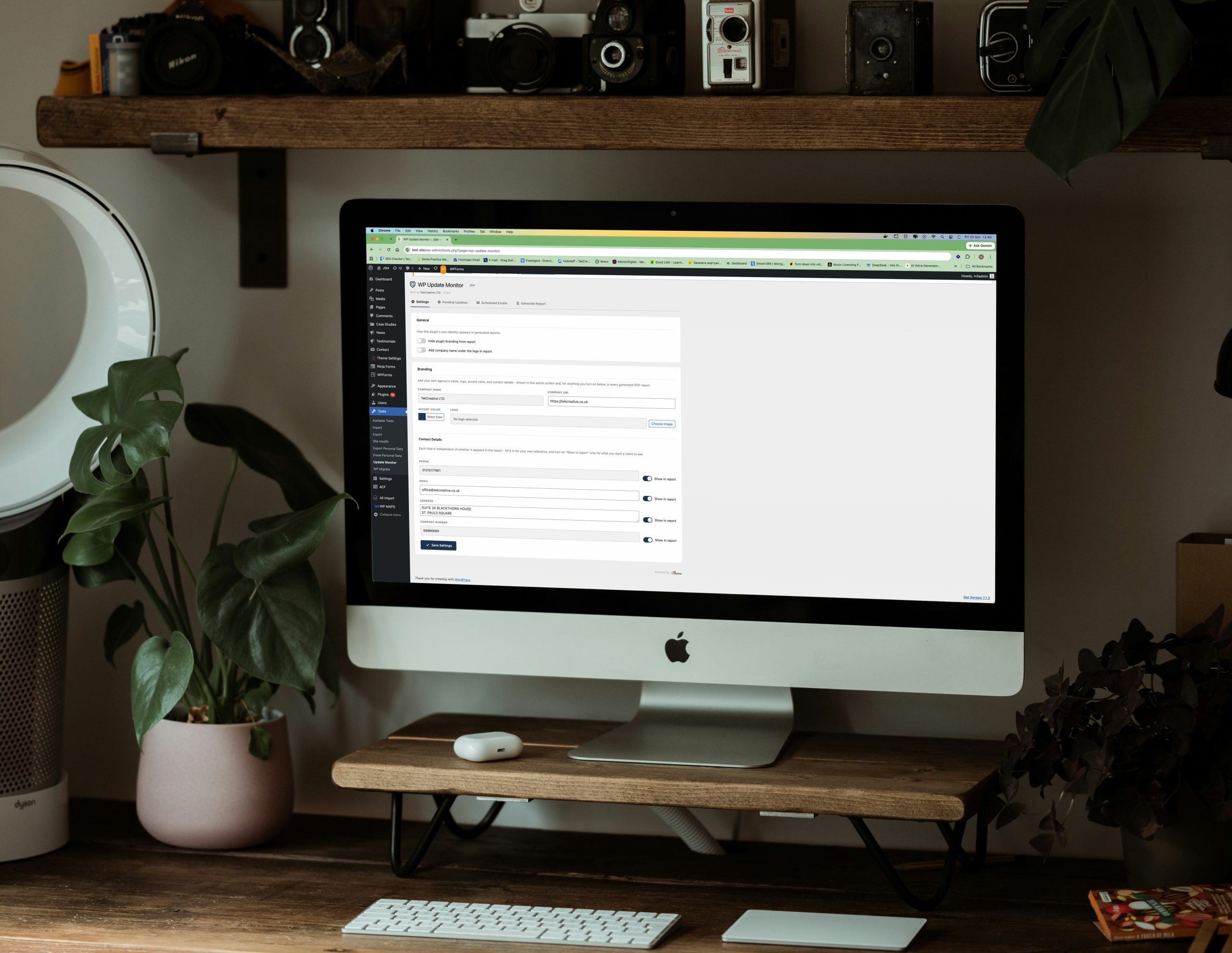
WP Update Monitor is a custom WordPress plugin developed by TekCreative to make website maintenance more transparent and easier to document. It records update history across WordPress core, plugins, themes and database versions, giving developers and website owners a clear record of what changed and when.
The plugin combines automatic update tracking with daily snapshots, allowing changes to be recorded through update events and periodic state comparisons. A dedicated dashboard also highlights pending updates, making it easier to identify components that may need attention without manually checking each part of the website.
For agencies and businesses managing ongoing WordPress maintenance, WP Update Monitor can generate PDF reports for a selected date range, providing a structured summary of completed updates. Multisite support allows update information to be managed across a network using shared database tables, making the plugin a practical tool for maintaining visibility across multiple websites.
A Custom WordPress Plugin for managing WordPress updates
WP Update Monitor by TekCreative helps developers and website owners maintain a clear history of WordPress updates. It records changes to core, plugins, themes and database versions through update events and daily snapshots, while a dedicated dashboard highlights components with pending updates. The plugin also generates date-range PDF reports to support maintenance documentation and client reporting, with multisite-aware tracking for network installations.
The Problem
WordPress provides tools for installing updates, but maintaining a useful historical record of those changes can be more difficult. When a plugin, theme or core version changes, website owners and developers may need to investigate when the update occurred, which component was affected and what the website’s previous state was.
This becomes particularly relevant for agencies providing ongoing maintenance. Clients may want a clear summary of the work completed during a billing period, while developers need reliable records to investigate unexpected behaviour or understand changes made before an issue appeared.
Without a dedicated tracking process, maintenance records can depend on manual notes, separate spreadsheets or information scattered across different systems. Checking for pending updates can also require navigating multiple areas of the WordPress administration interface.
TekCreative built WP Update Monitor to bring update history, pending update visibility and maintenance reporting into one WordPress plugin.
What the Plugin Does
WP Update Monitor combines three core capabilities to help manage WordPress update history and maintenance records.
Automatic Update History
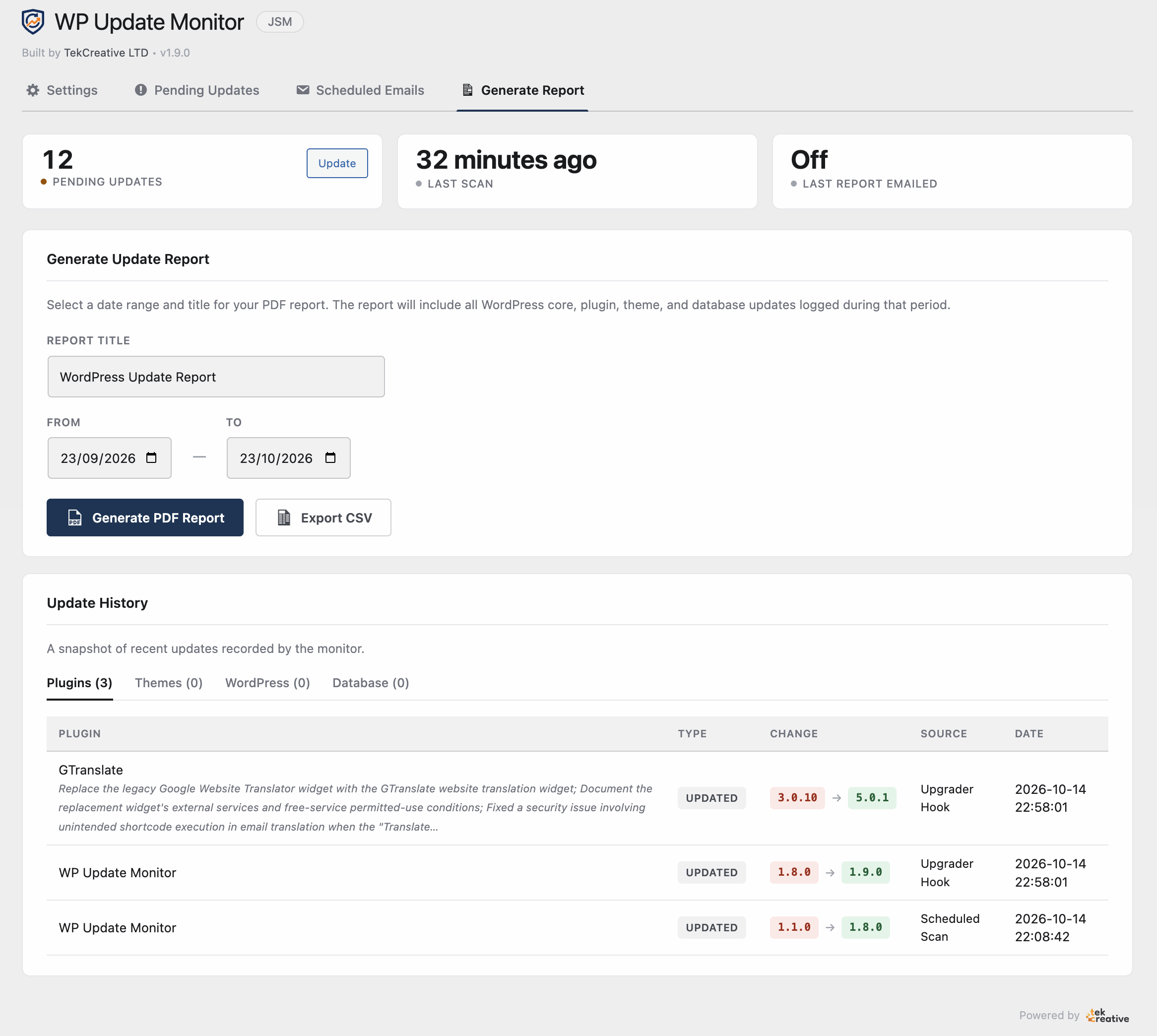
The plugin records changes affecting WordPress core, installed plugins, themes and database versions. It uses WordPress update events alongside daily snapshots to capture version changes and maintain a historical record of the site’s state.
This gives developers a reference point when reviewing maintenance activity, investigating unexpected changes or preparing a summary of updates performed over time.
Automatic Update History
The plugin records changes affecting WordPress core, installed plugins, themes and database versions. It uses WordPress update events alongside daily snapshots to capture version changes and maintain a historical record of the site’s state.
This gives developers a reference point when reviewing maintenance activity, investigating unexpected changes or preparing a summary of updates performed over time.
PDF Maintenance Reports
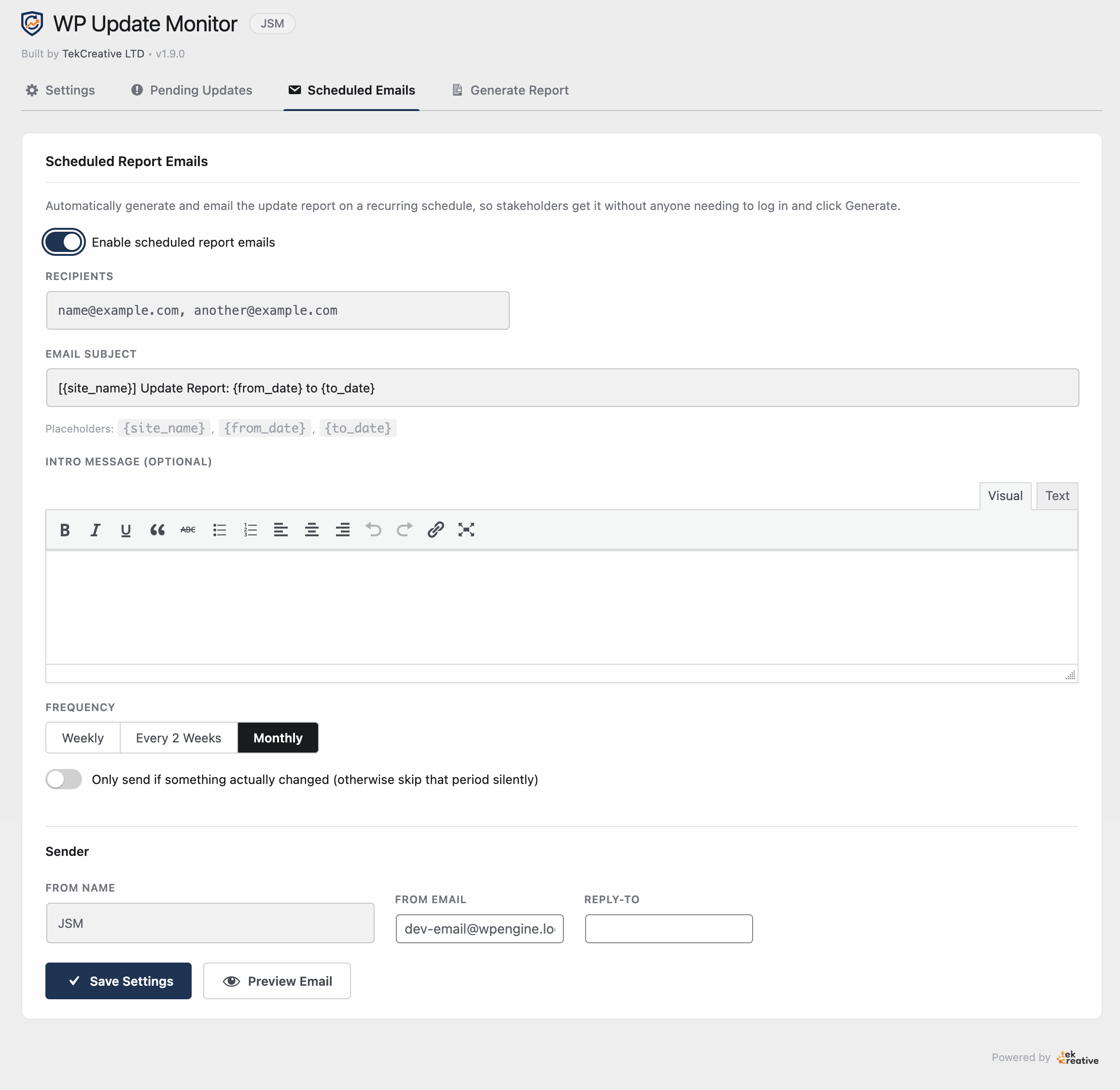
WP Update Monitor can generate PDF reports for a selected date range, summarising recorded updates within that period. These reports provide a structured record that agencies can use when communicating maintenance activity to clients.
Instead of manually compiling a list of updates, developers can use the recorded history to prepare documentation for a monthly maintenance period or another agreed reporting window.
Pending Updates Dashboard
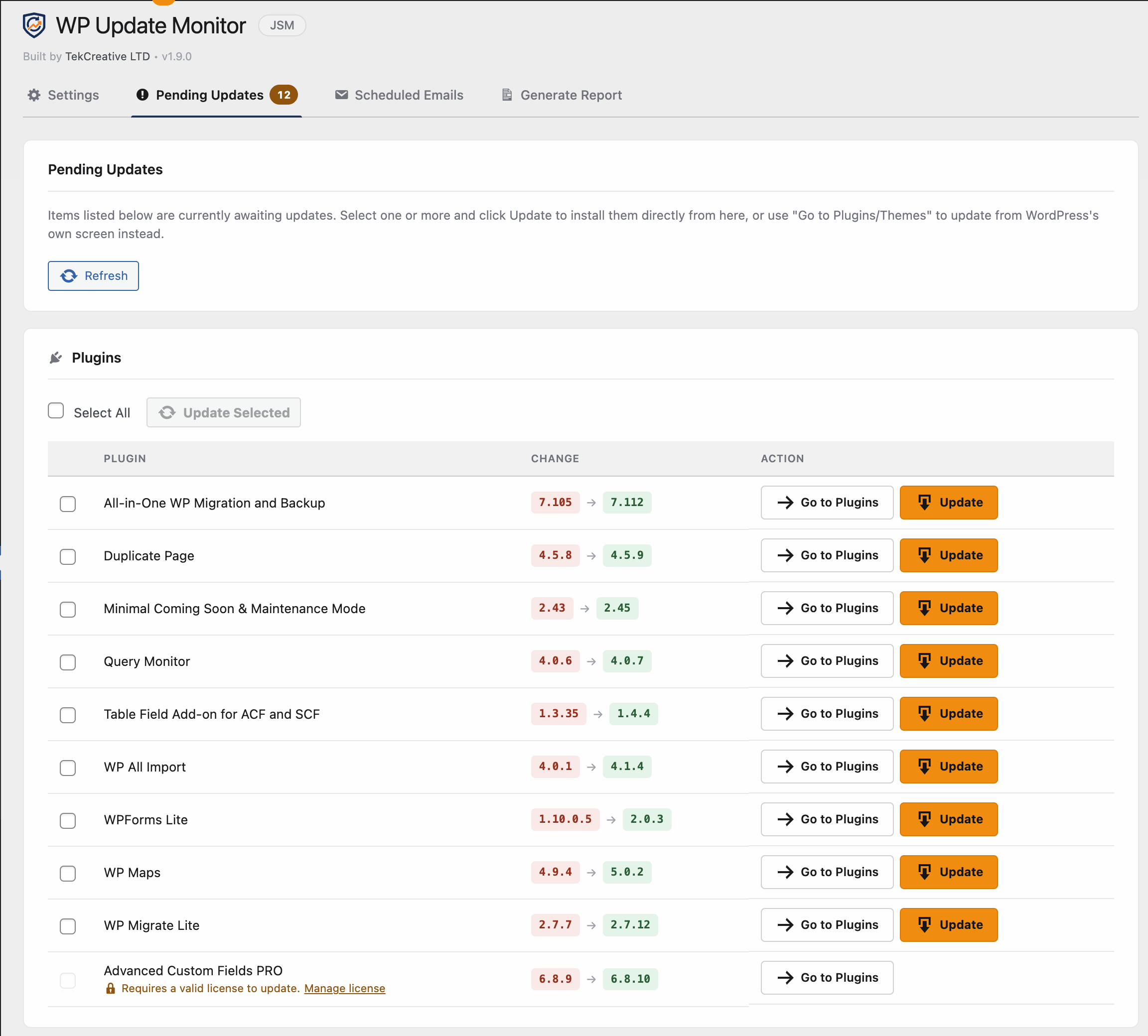
A dedicated interface displays components that currently have updates available. This makes it easier to review outdated WordPress core, plugins and themes from within the plugin rather than searching through separate administration screens.
The historical records and pending updates view serve different purposes: one helps explain what has changed, while the other highlights what may still require attention.
Multisite-Aware Tracking
For WordPress Multisite installations, the plugin uses shared database tables to manage update records across the network rather than maintaining fragmented tracking data for each individual site.
This provides a more centralised approach for agencies and administrators responsible for multiple sites within the same network.
Why It Needed to Be Built
Website maintenance involves more than applying updates. Developers also need to understand what changed, keep records of completed work and communicate that activity clearly to clients.
WordPress’s standard administration interface is designed primarily for managing the current website state, not for providing a complete maintenance reporting workflow. A site owner can see available updates and installed versions, but a historical audit trail and a date-range report may require additional tools or manual processes.
For agencies managing multiple client websites, this creates repetitive administrative work. Update records must be gathered, reporting takes time and the details can become difficult to reconstruct when they were not documented consistently.
WP Update Monitor addresses these requirements with a focused plugin that combines automatic tracking, historical records and exportable reports. It is designed to complement existing WordPress maintenance workflows rather than replace the tools used to apply updates.
Why TekCreative Built It
TekCreative develops and maintains WordPress websites for businesses that need ongoing technical support. As part of that work, keeping track of updates and documenting maintenance activity are important for both internal oversight and client communication.
WP Update Monitor was developed as a reusable tool for these requirements. Instead of relying on manual tracking or building separate reporting functionality for individual maintenance projects, it brings update logging, pending update visibility and PDF reporting into one place.
The plugin reflects TekCreative’s approach to technical problem-solving: identify a recurring operational problem, build a focused solution and make the result practical to use within everyday WordPress workflows.
How It Helps Businesses
Maintain a Historical Record of Updates
Automatic logging and daily snapshots provide a record of version changes across WordPress core, plugins, themes and database versions. This can help developers investigate when changes occurred and review the history surrounding a technical issue.
Improve Maintenance Reporting
PDF reports for a selected date range make it easier to document recorded update activity during a maintenance period. Agencies can use these reports as supporting evidence when communicating completed work to clients.
Identify Updates That Need Attention
The pending updates view gives administrators a convenient place to review outdated components. This supports maintenance checks without requiring them to navigate through separate WordPress update screens.
Reduce Manual Administration
By recording update activity automatically, the plugin reduces the need to maintain a separate manual list of version changes. Report generation also helps reduce the effort involved in compiling maintenance summaries.
Manage Multisite Update Records
Shared tracking tables provide a network-aware approach to recording updates across WordPress Multisite installations. This is useful for administrators who need a more centralised view of maintenance activity across a network.
Support More Consistent Maintenance Workflows
A combination of update history, current update visibility and exportable reports gives developers a practical reference for ongoing maintenance. The plugin supports documentation and oversight while leaving the actual update and troubleshooting process under the control of the site’s administrators.
The Result
WP Update Monitor provides a centralised way to record WordPress update history, review pending updates and prepare PDF maintenance reports. By combining event-based logging with daily snapshots, it helps preserve a record of changes that would otherwise be more difficult to reconstruct later.
For agencies such as TekCreative, the plugin can support a more consistent approach to maintenance documentation and client reporting. Its multisite-aware design also makes it suitable for network installations where update history needs to be managed across multiple sites.
The plugin is designed to improve visibility and reduce manual reporting effort. It does not replace backups, testing, update management or other maintenance safeguards, but it provides a useful record to support those processes.
Technology Stack
- WordPress and PHP: Plugin architecture, update tracking and administration interface.
- WordPress Update Hooks: Event-based recording of update activity.
- Scheduled Snapshots: Periodic comparisons of the site’s recorded state.
- WordPress Database: Persistent storage for update history and tracking records.
- WordPress Multisite: Shared tracking data for network installations.
- Dompdf: PDF generation for date-range maintenance reports.
- WordPress Administration APIs: Integration with the dashboard and plugin management workflow.
Built with the right technologies for a complex platform
Dancitive combines Laravel, React and Inertia.js with a range of supporting technologies and services to power its event management, social features, payments, mapping and administration.







More projects from our development team
Explore more custom platforms, business applications and digital solutions we’ve built for businesses with complex technical requirements.
CONTACT US
Get in touch
Got a custom development project, an integration that isn’t working or a platform that has outgrown its current build? Tell us what you’re dealing with, and we’ll review the technical requirements and recommend a practical way forward.

Give us a call and get an answer in seconds
Speak directly with our team about your platform, what you’re trying to improve and the technical challenges you’re facing. We’ll give you an honest view of what would be involved and where we can help.
Fill the contact form and we will contact you
Tell us about your current platform, what isn’t working properly, what you’re trying to build or where you need technical support. We’ll review the details and come back with a clear assessment and next steps.